(16 intermediate revisions by the same user not shown)
Line 1:
Line 1:
Welcome to GladiusRO! This guide will help new players begin their adventure.
Welcome to '''GladiusRO'''! Before entering the game, every new player must register and create a game account.[[File:GladiusRO Create Account.png|alt=GladiusRO Create Account|thumb|GladiusRO Create Account]]
== Step 1: Create an Account ==
== Step 1: Read the Server Rules ==
Visit the <u>[https://gladiusro.com/fluxcp/?module=account&action=create Register GladiusRO]</u> website and register a game account.
Before registering, please read and understand the [https://gladiusro.com/fluxcp/?module=pages&action=content&path=rules GladiusRO server rules]. Creating an account means that you agree to follow the server rules.
== Step 2: Download the Client ==
== Step 2: Open the Registration Page ==
<u>[https://gladiusro.com/fluxcp/?module=pages&action=content&path=downloads Download]</u> and install the latest GladiusRO full client.
Visit the official GladiusRO account registration page:
== Step 3: Start the Game ==
[https://gladiusro.com/fluxcp/?module=account&action=create Create a GladiusRO Account][[File:Download GladiusRO game.png|alt=Download GladiusRO Game|thumb|Download GladiusRO Game]]For account security, make sure the address begins with:
Run the GladiusRO patcher, allow all updates to finish, and launch the game.
Enter the requested information on the registration page:
Log in using your registered game account and create your first character.
# '''Username''' – Create a username for the game account.
# '''Password''' – Create a secure password.
# '''Confirm Password''' – Enter the same password again.
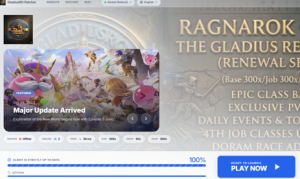
# '''E-mail Address''' – Enter a valid e-mail address that can be accessed.[[File:GladiusRO Launcher.png|alt=GladiusRO Launcher.exe|thumb|GladiusRO Launcher.exe]]
# '''Confirm E-mail Address''' – Enter the same e-mail address again.
# '''Gender''' – Select the required account option.
# '''Birthdate''' – Enter the correct birthdate.
== Password Requirements ==
The account password must:[[File:GladiusRO create character.png|alt=GladiusRO create character|thumb|GladiusRO create character]]
* Contain between '''8 and 31 characters'''.
* Include at least '''one uppercase letter'''.
* Include at least '''one lowercase letter'''.
* Include at least '''one number'''.
* Not contain the account username.
'''Example format only:''' A secure password can use a mixture of uppercase letters, lowercase letters, numbers, and special characters. Do not copy a public example as the actual password.
== Step 4: Create the Account ==
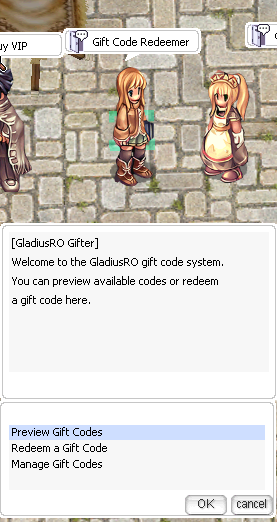
# [[File:GladiusRO Gift.png|alt=location: prontera,157,187|thumb|location: prontera,157,187]]Check that all information is correct.
# Read the server rules.
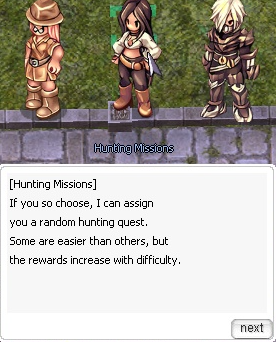
# Click '''Create My Account'''.[[File:Hunting missions.png|alt=hunting missions|thumb|location: prontera 147, 168]]
# If e-mail confirmation is required, open the registered e-mail inbox and follow the confirmation instructions.
# Keep the username and password secure.
== Step 5: Log In and Start Playing ==
After registration and any required e-mail confirmation are complete:
# Open the GladiusRO game client.
# Enter the registered username and password.
# Log in to the game.
# Select the server, create a character, and begin the adventure.
== Important Account Security Tips ==
* Use a valid e-mail address that can be accessed.
* Use a unique password that is not used on another website or game.
* Never share the account password with another player.
* GladiusRO staff should never need the account password.
* Do not register through links sent by unknown players.
* Always verify that the website domain is '''gladiusro.com'''.
* Do not post account details in Discord, forums, social media, or public chats.
* Store account recovery details safely.
== Registration Problems ==
If registration cannot be completed:
== Step 5: Beginner Start ==
* Check that the password follows every password requirement.
[[File:Hunting missions.png|alt=hunting missions|left|thumb|location: prontera 147, 168]]Speak to the GladiusRO Gifter NPC to receive your freebies. Start leviling or do hunting quest as below location.
* Confirm that the password and confirmation password are identical.
* Confirm that both e-mail entries are identical.
* Make sure the username is not already in use.
* Check the e-mail inbox and spam or junk folder for a confirmation message.
* Use the '''Resend E-mail Confirmation''' option if the confirmation message does not arrive.
* Use the '''Reset Password''' option if the password is forgotten.
== Quick Start Summary ==
# Register at [https://gladiusro.com/fluxcp/?module=account&action=create the official GladiusRO registration page].
# Complete all required account information.
# Use a password containing uppercase and lowercase letters, a number, and 8–31 characters.
# Confirm the account through e-mail if requested.
# Open the game client and log in with the new account.
# Create a character and start playing GladiusRO!
----
Latest revision as of 04:52, 1 October 2026
Welcome to GladiusRO! Before entering the game, every new player must register and create a game account.
Enter the requested information on the registration page:
Username – Create a username for the game account.
Password – Create a secure password.
Confirm Password – Enter the same password again.
E-mail Address – Enter a valid e-mail address that can be accessed.GladiusRO Launcher.exe
Confirm E-mail Address – Enter the same e-mail address again.
Gender – Select the required account option.
Birthdate – Enter the correct birthdate.
Password Requirements
The account password must:
GladiusRO create character
Contain between 8 and 31 characters.
Include at least one uppercase letter.
Include at least one lowercase letter.
Include at least one number.
Not contain the account username.
Example format only: A secure password can use a mixture of uppercase letters, lowercase letters, numbers, and special characters. Do not copy a public example as the actual password.
Step 4: Create the Account
location: prontera,157,187Check that all information is correct.
Read the server rules.
Click Create My Account.location: prontera 147, 168
If e-mail confirmation is required, open the registered e-mail inbox and follow the confirmation instructions.
Keep the username and password secure.
Step 5: Log In and Start Playing
After registration and any required e-mail confirmation are complete:
Open the GladiusRO game client.
Enter the registered username and password.
Log in to the game.
Select the server, create a character, and begin the adventure.
Important Account Security Tips
Use a valid e-mail address that can be accessed.
Use a unique password that is not used on another website or game.
Never share the account password with another player.
GladiusRO staff should never need the account password.
Do not register through links sent by unknown players.
Always verify that the website domain is gladiusro.com.
Do not post account details in Discord, forums, social media, or public chats.
Store account recovery details safely.
Registration Problems
If registration cannot be completed:
Check that the password follows every password requirement.
Confirm that the password and confirmation password are identical.
Confirm that both e-mail entries are identical.
Make sure the username is not already in use.
Check the e-mail inbox and spam or junk folder for a confirmation message.
Use the Resend E-mail Confirmation option if the confirmation message does not arrive.
Use the Reset Password option if the password is forgotten.