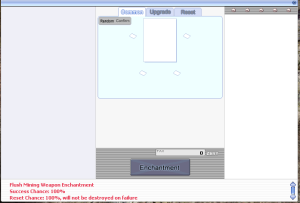
# The NPC has the waiting-room title '''Flush Weapon Enchantment'''.
# The NPC has the waiting-room title '''Flush Weapon Enchantment'''.
# Speak to the NPC and select '''Open Flush Enchantment'''.
# Speak to the NPC and select '''Open Flush Enchantment'''.
== Base Weapon Drops from Mjolnir Cave (near Flush Mk4U) ==
Renire can drop the following original Einbech weapons:
{| class="wikitable sortable"
!No.
!Base Weapon
!Item ID
!Matching Amplify Blueprint
!Weapon Drop Rate
|-
|1
|Metal Detector MK47 [2]
|28771
|Amplify (Metal Detector MK47)
|0.50%
|-
|2
|Jewel Detector MK47 [2]
|28772
|Amplify (Jewel Detector MK47)
|0.50%
|-
|3
|Safety Saber [2]
|13493
|Amplify (Safety Saber)
|0.50%
|-
|4
|Safety Foxtail [2]
|550006
|Amplify (Safety Foxtail)
|0.50%
|-
|5
|Blocking Spear [2]
|32018
|Amplify (Blocking Spear)
|0.50%
|-
|6
|Claw Sword [2]
|21050
|Amplify (Claw Sword)
|0.50%
|-
|7
|Rubber Hammer [2]
|16088
|Amplify (Rubber Hammer)
|0.50%
|-
|8
|Saw Axe [2]
|28140
|Amplify (Saw Axe)
|0.50%
|-
|9
|Safety Knuckle [2]
|1862
|Amplify (Safety Knuckle)
|0.50%
|-
|10
|Safety Manual [2]
|32350
|Amplify (Safety Manual)
|0.50%
|-
|11
|Welding Wand [2]
|26162
|Amplify (Welding Wand)
|0.50%
|-
|12
|Detecting Staff [2]
|2058
|Amplify (Detecting Staff)
|0.50%
|-
|13
|Grinder Huuma Shuriken [2]
|13346
|Amplify (Grinder Huuma Shuriken)
|0.50%
|-
|14
|Bolt Shooter [2]
|18190
|Amplify (Bolt Shooter)
|0.50%
|-
|15
|Bolt Crusher [2]
|28045
|Amplify (Bolt Crusher)
|0.50%
|-
|16
|Bolt Revolver [2]
|32303
|Amplify (Bolt Revolver)
|0.50%
|-
|17
|Safety Whip [2]
|26212
|Amplify (Safety Whip)
|0.50%
|-
|18
|Safety Lute [2]
|32111
|Amplify (Safety Lute)
|0.50%
|}
== Important Information About the 19th Blueprint ==
There are '''19 Amplify Blueprints''', but only '''18 unique original base weapons'''.
The additional blueprint is:
Amplify (Metal Detector MK47-2)
Item ID: 102126
The Metal Detector MK47-2 route uses the existing:
Metal Detector MK47 [2]
Item ID: 28771
Therefore, Renire does not need to drop a separate 19th original weapon. The original Metal Detector MK47 supports both stages of its Flush weapon progression.
== How to Create a Flush Weapon ==
Players must collect:
* The corresponding original base weapon dropped by Renire
* The matching Amplify Blueprint
* Shadowdecon
* Dynite
* Weapon Enhancement Stone (High Grade)
* Mjolnir's Treasure
* Mjolnir's Energy
The original weapon and Amplify Blueprint must match.
For example:
Detecting Staff [2]
+ Amplify (Detecting Staff)
+ Shadowdecon
+ Dynite
+ Weapon Enhancement Stone (High Grade)
+ Mjolnir's Treasure
+ Mjolnir's Energy
= Flush Detecting Staff [2]
Detecting Staff Example:
{| class="wikitable"
{| class="wikitable"
!Requirement
!Requirement
Line 247:
Line 77:
|Final reform result
|Final reform result
|}
|}
== New Flush Weapon Series ==
The Flush Weapon Series consists primarily of Level 250, Weapon Level 5 equipment designed for expanded classes and fourth jobs.
{| class="wikitable sortable"
!Weapon
!Type
!Main Class
|-
|Flush Metal Detector Mk47 [2]
|Dagger
|Shadow Cross
|-
|Flush Jewel Detector Mk47 [2]
|Dagger
|Abyss Chaser
|-
|Flush Safety Saber [2]
|Sword
|Biolo
|-
|Flush Safety Foxtail [2]
|One-Handed Staff
|Spirit Handler
|-
|Flush Blocking Spear [2]
|Spear
|Imperial Guard
|-
|Flush Claw Sword [2]
|Two-Handed Sword
|Dragon Knight
|-
|Flush Rubber Hammer [2]
|Mace
|Cardinal
|-
|Flush Saw Axe [2]
|Two-Handed Axe
|Meister
|-
|Flush Safety Knuckle [2]
|Knuckle
|Inquisitor
|-
|Flush Safety Manual [2]
|Book
|Sky Emperor
|-
|Flush Welding Wand [2]
|Staff
|Soul Ascetic
|-
|Flush Detecting Staff [2]
|Two-Handed Staff
|Arch Mage
|-
|Flush Grinder Huuma Shuriken [2]
|Huuma Shuriken
|Shinkiro / Shiranui
|-
|Flush Bolt Shooter [2]
|Bow
|Windhawk
|-
|Flush Bolt Crusher [2]
|Katar
|Shadow Cross
|-
|Flush Bolt Revolver [2]
|Pistol
|Night Watch
|-
|Flush Safety Whip [2]
|Whip
|Trouvere
|-
|Flush Safety Lute [2]
|Instrument
|Troubadour
|-
|Flush Metal Detector Mk47-2
|Dagger
|Shadow Cross
|}
=== General Upgrade Bonuses ===
Flush weapons commonly provide additional effects at these refinement levels:
* '''Refine +9:''' Additional skill damage and damage against enemies of different sizes.
* '''Refine +11:''' Further skill damage and global cooldown reduction.
* '''Grade D:''' Commonly provides P.Atk or S.Matk.
* '''Grade C:''' Commonly improves the weapon's supported skills.
* '''Grade B:''' Commonly improves damage against enemies of different properties.
* '''Grade A:''' Commonly provides another increase to supported skill damage.
'''Note:''' Exact effects are different for every weapon. Always check the in-game item description before refining, grading, enchanting, or trading a Flush weapon.
== How to Enchant a Flush Mine Weapon ==
== How to Enchant a Flush Mine Weapon ==
Revision as of 02:25, 11 November 2026
The Flush Mine Weapon Enchantment system allows eligible players to enchant, upgrade, or reset supported Flush Mine Weapons through the NPC Flush Mk4U.
Refine +9: Additional skill damage and damage against enemies of different sizes.
Refine +11: Further skill damage and global cooldown reduction.
Grade D: Commonly provides P.Atk or S.Matk.
Grade C: Commonly improves the weapon's supported skills.
Grade B: Commonly improves damage against enemies of different properties.
Grade A: Commonly provides another increase to supported skill damage.
Note: Exact effects are different for every weapon. Always check the in-game item description before refining, grading, enchanting, or trading a Flush weapon.
How to Enchant a Flush Mine Weapon
Unequip the Flush Mine Weapon.
Place it in your normal inventory.
Speak to Flush Mk4U at ein_fild08, 199, 50.
Select Open Flush Enchantment.
Choose the eligible weapon from the enchantment interface.
Select the available enchantment service.
Review the enchantment slot, required materials, Zeny cost, and displayed result information.
Confirm only after checking that the correct weapon has been selected.
After completion, inspect the weapon description to verify the new enchantment.
Upgrading an Existing Enchantment
Some existing enchantments may have an upgrade option in the interface.
Unequip the enchanted Flush Mine Weapon.
Keep it in your inventory.
Open the enchantment interface through Flush Mk4U.
Select the weapon and the relevant enchantment slot.
Choose the available upgrade option.
Check the required materials and Zeny.
Review all information displayed by the interface.
Confirm the upgrade.
Recheck the weapon after the process is completed.
Resetting Enchantments
The reset service is used when you want to remove or reset an existing enchantment, subject to the options provided by the interface.
Unequip the Flush Mine Weapon.
Place it in your inventory.
Speak to Flush Mk4U.
Open the enchantment interface.
Select the correct weapon.
Choose the reset option for the relevant enchantment slot.
Read the reset conditions and cost carefully.
Confirm the reset only if you accept the displayed result.
Inspect the weapon after the reset is completed.
Materials and Zeny
The exact materials and Zeny required are shown directly in the enchantment interface. Costs may differ depending on:
The selected Flush Mine Weapon.
The enchantment slot.
Whether you are adding, upgrading, or resetting an enchantment.
The current enchantment already attached to the weapon.
Because the interface provides the live requirement, players should use the displayed cost as the final reference before confirming.
Troubleshooting
The NPC refuses to provide the service
Your character may be below Base Level 250. Reach Base Level 250 and speak to Flush Mk4U again.
My weapon does not appear in the list
Check the following:
The weapon is a supported Flush Mine Weapon.
The weapon is in your normal inventory.
The weapon is not equipped.
You selected the correct character and weapon.
The item is not being held in storage, cart, or another inventory window.
The enchant or upgrade option is unavailable
The selected weapon, slot, or existing enchantment may not meet the next-stage conditions. Review the available options and requirements shown in the interface.
I do not have enough materials or Zeny
Write down or take a screenshot of the displayed requirements, collect the missing materials or Zeny, and then return to Flush Mk4U.
I selected the wrong weapon
Do not confirm the operation. Cancel or close the interface and restart the process with the correct weapon. If the operation has already been confirmed, contact the GladiusRO support team and provide any available screenshots or transaction details. Restoration is subject to server policy and is not guaranteed.
Frequently Asked Questions
What Base Level is required?
Your character must be at least Base Level 250.
Where is the enchantment NPC?
Flush Mk4U is located at ein_fild08, 199, 50.
Can I enchant a weapon while it is equipped?
No. The weapon must be unequipped and placed in your inventory.
Can every weapon use this system?
No. This service is intended for supported Flush Mine Weapons accepted by the enchantment interface.
How do I know which materials are required?
Select the weapon and service. The interface will display the exact materials and Zeny required.
Can I improve an existing enchantment?
If an upgrade option is available for the selected weapon and enchantment, it will be shown in the interface.
Can I reset an enchantment?
Yes, when the reset option is available. Review the displayed conditions and cost before confirming.
What happens if my weapon is not listed?
Unequip it, move it into your normal inventory, and confirm that it is a supported Flush Mine Weapon. If it is still missing, contact the GladiusRO support team.
Recommended Safety Checklist
Before pressing the final confirmation button, verify:
[ ] I selected the correct character.
[ ] I selected the correct Flush Mine Weapon.
[ ] The weapon is not equipped.
[ ] I selected the intended enchantment slot.
[ ] I selected the intended service: enchant, upgrade, or reset.
[ ] I reviewed the required materials and Zeny.
[ ] I understand the displayed result or possible result.