Newbie Guide: Difference between revisions
No edit summary |
No edit summary |
||
| Line 1: | Line 1: | ||
Welcome to '''GladiusRO'''! Before entering the game, every new player must register and create a game account.[[File:GladiusRO Create Account.png|alt=GladiusRO Create Account|thumb|GladiusRO Create Account]] | |||
== Step 1: Read the Server Rules == | |||
Before registering, please read and understand the [https://gladiusro.com/fluxcp/?module=pages&action=content&path=rules GladiusRO server rules]. Creating an account means that you agree to follow the server rules. | |||
== Step 2: Open the Registration Page == | |||
Visit the official GladiusRO account registration page: | |||
[https://gladiusro.com/fluxcp/?module=account&action=create Create a GladiusRO Account][[File:Download GladiusRO game.png|alt=Download GladiusRO Game|thumb|Download GladiusRO Game]]For account security, make sure the address begins with: | |||
https://gladiusro.com/ | |||
== Step 3: Complete the Registration Form == | |||
Enter the requested information on the registration page: | |||
# '''Username''' – Create a username for the game account. | |||
# '''Password''' – Create a secure password. | |||
# '''Confirm Password''' – Enter the same password again. | |||
# '''E-mail Address''' – Enter a valid e-mail address that can be accessed.[[File:GladiusRO Launcher.png|alt=GladiusRO Launcher.exe|thumb|GladiusRO Launcher.exe]] | |||
# '''Confirm E-mail Address''' – Enter the same e-mail address again. | |||
# '''Gender''' – Select the required account option. | |||
# '''Birthdate''' – Enter the correct birthdate. | |||
== Password Requirements == | |||
The account password must:[[File:GladiusRO create character.png|alt=GladiusRO create character|thumb|GladiusRO create character]] | |||
* Contain between '''8 and 31 characters'''. | |||
* Include at least '''one uppercase letter'''. | |||
* Include at least '''one lowercase letter'''. | |||
* Include at least '''one number'''. | |||
* Not contain the account username. | |||
'''Example format only:''' A secure password can use a mixture of uppercase letters, lowercase letters, numbers, and special characters. Do not copy a public example as the actual password. | |||
== Step 4: Create the Account == | |||
# Check that all information is correct. | |||
# Read the server rules. | |||
# Click '''Create My Account'''.[[File:Hunting missions.png|alt=hunting missions|thumb|location: prontera 147, 168]] | |||
# If e-mail confirmation is required, open the registered e-mail inbox and follow the confirmation instructions. | |||
# Keep the username and password secure. | |||
== Step 5: Log In and Start Playing == | |||
After registration and any required e-mail confirmation are complete: | |||
# Open the GladiusRO game client. | |||
# Enter the registered username and password. | |||
# Log in to the game. | |||
# Select the server, create a character, and begin the adventure. | |||
== Important Account Security Tips == | |||
* Use a valid e-mail address that can be accessed. | |||
* Use a unique password that is not used on another website or game. | |||
* Never share the account password with another player. | |||
* GladiusRO staff should never need the account password. | |||
* Do not register through links sent by unknown players. | |||
* Always verify that the website domain is '''gladiusro.com'''. | |||
* Do not post account details in Discord, forums, social media, or public chats. | |||
* Store account recovery details safely. | |||
== Registration Problems == | |||
If registration cannot be completed: | |||
* Check that the password follows every password requirement. | |||
* Confirm that the password and confirmation password are identical. | |||
* Confirm that both e-mail entries are identical. | |||
* Make sure the username is not already in use. | |||
* Check the e-mail inbox and spam or junk folder for a confirmation message. | |||
* Use the '''Resend E-mail Confirmation''' option if the confirmation message does not arrive. | |||
* Use the '''Reset Password''' option if the password is forgotten. | |||
== Quick Start Summary == | |||
# Register at [https://gladiusro.com/fluxcp/?module=account&action=create the official GladiusRO registration page]. | |||
# Complete all required account information. | |||
# Use a password containing uppercase and lowercase letters, a number, and 8–31 characters. | |||
# Confirm the account through e-mail if requested. | |||
# Open the game client and log in with the new account. | |||
# Create a character and start playing GladiusRO! | |||
----'''Create your account and begin your adventure in GladiusRO!''' | |||
Welcome to GladiusRO! This guide will help new players begin their adventure. | Welcome to GladiusRO! This guide will help new players begin their adventure. | ||
Step 1: Create an Account | Step 1: Create an Account | ||
| Line 14: | Line 98: | ||
Download and install the latest GladiusRO full client. | Download and install the latest GladiusRO full client. | ||
| Line 27: | Line 111: | ||
Run the GladiusRO patcher, allow all updates to finish, and launch the game. | Run the GladiusRO patcher, allow all updates to finish, and launch the game. | ||
| Line 38: | Line 122: | ||
Log in using your registered game account and create your first character. | Log in using your registered game account and create your first character. | ||
| Line 53: | Line 137: | ||
Step 5: Beginner Start | Step 5: Beginner Start | ||
Speak to the GladiusRO Gifter NPC to receive your freebies. Start leviling or do hunting quest as below location. | |||
Speak to the GladiusRO Gifter NPC to receive your freebies. Start leviling or do hunting quest as below location. | |||
Revision as of 04:41, 1 October 2026
Welcome to GladiusRO! Before entering the game, every new player must register and create a game account.

Step 1: Read the Server Rules
Before registering, please read and understand the GladiusRO server rules. Creating an account means that you agree to follow the server rules.
Step 2: Open the Registration Page
Visit the official GladiusRO account registration page:

For account security, make sure the address begins with:
https://gladiusro.com/
Step 3: Complete the Registration Form
Enter the requested information on the registration page:
- Username – Create a username for the game account.
- Password – Create a secure password.
- Confirm Password – Enter the same password again.
- E-mail Address – Enter a valid e-mail address that can be accessed.
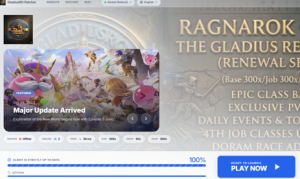
GladiusRO Launcher.exe - Confirm E-mail Address – Enter the same e-mail address again.
- Gender – Select the required account option.
- Birthdate – Enter the correct birthdate.

Password Requirements
The account password must:

- Contain between 8 and 31 characters.
- Include at least one uppercase letter.
- Include at least one lowercase letter.
- Include at least one number.
- Not contain the account username.
Example format only: A secure password can use a mixture of uppercase letters, lowercase letters, numbers, and special characters. Do not copy a public example as the actual password.
Step 4: Create the Account
- Check that all information is correct.
- Read the server rules.
- Click Create My Account.
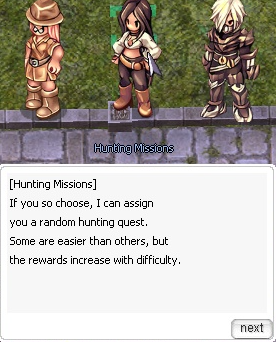
location: prontera 147, 168 - If e-mail confirmation is required, open the registered e-mail inbox and follow the confirmation instructions.
- Keep the username and password secure.

Step 5: Log In and Start Playing
After registration and any required e-mail confirmation are complete:
- Open the GladiusRO game client.
- Enter the registered username and password.
- Log in to the game.
- Select the server, create a character, and begin the adventure.
Important Account Security Tips
- Use a valid e-mail address that can be accessed.
- Use a unique password that is not used on another website or game.
- Never share the account password with another player.
- GladiusRO staff should never need the account password.
- Do not register through links sent by unknown players.
- Always verify that the website domain is gladiusro.com.
- Do not post account details in Discord, forums, social media, or public chats.
- Store account recovery details safely.
Registration Problems
If registration cannot be completed:
- Check that the password follows every password requirement.
- Confirm that the password and confirmation password are identical.
- Confirm that both e-mail entries are identical.
- Make sure the username is not already in use.
- Check the e-mail inbox and spam or junk folder for a confirmation message.
- Use the Resend E-mail Confirmation option if the confirmation message does not arrive.
- Use the Reset Password option if the password is forgotten.
Quick Start Summary
- Register at the official GladiusRO registration page.
- Complete all required account information.
- Use a password containing uppercase and lowercase letters, a number, and 8–31 characters.
- Confirm the account through e-mail if requested.
- Open the game client and log in with the new account.
- Create a character and start playing GladiusRO!
Create your account and begin your adventure in GladiusRO!
Welcome to GladiusRO! This guide will help new players begin their adventure.
Step 1: Create an Account
Step 2: Download the Client
Download and install the latest GladiusRO full client.
Step 3: Start the Game
Run the GladiusRO patcher, allow all updates to finish, and launch the game.
Step 4: Create a Character
Log in using your registered game account and create your first character.
Step 5: Beginner Start
Step 5: Beginner Start
Speak to the GladiusRO Gifter NPC to receive your freebies. Start leviling or do hunting quest as below location.