This complete guide explains how to unlock Varmundt's Mansion, reach the rune NPCs, exchange materials for the correct rune, and enchant eligible Varmundt equipment.
This complete guide explains how to unlock Varmundt's Mansion, reach the rune NPCs, exchange materials for the correct rune, and enchant eligible Varmundt equipment.
Line 7:
Line 8:
* '''Coordinates:''' 364, 50
* '''Coordinates:''' 364, 50
* '''Area:''' Varmundt's Mansion Interior
* '''Area:''' Varmundt's Mansion Interior
[[File:Main materials to enchant varmunt equipment.png|alt=main materials to enchant varmunt equipment|thumb|main materials to enchant varmunt equipment]]
Use the following navigation command after gaining access to the mansion:
Use the following navigation command after gaining access to the mansion:
# After registration, the character can access the mansion facilities unlocked by the quest.
# [[File:Varmundt Equipment Mod Betas.png|alt=Varmundt Equipment Mod Beta|thumb|Varmundt Equipment Mod Beta]]After registration, the character can access the mansion facilities unlocked by the quest.
{{Note|Do not skip NPC dialogue too quickly. Some quest variables are updated only after selecting the correct dialogue option or completing the full conversation.}}
{{Note|Do not skip NPC dialogue too quickly. Some quest variables are updated only after selecting the correct dialogue option or completing the full conversation.}}
Line 95:
Line 99:
# Enter Varmundt's Mansion.
# Enter Varmundt's Mansion.
# Move into the mansion interior map, '''ba_in01'''.
# [[File:Enchant Modified Equip Betas.png|alt=Enchant Modified Equip Beta|thumb|Enchant Modified Equip Beta]]Move into the mansion interior map, '''ba_in01'''.
# Enter the following command:
# Enter the following command:
#:
#:
Revision as of 15:59, 14 November 2026
location: ba_in01 364, 50
This complete guide explains how to unlock Varmundt's Mansion, reach the rune NPCs, exchange materials for the correct rune, and enchant eligible Varmundt equipment.
Players must normally complete the Episode 17.1: Illusion main quest before starting Episode 17.2.
Episode 17.2 continues the story from Episode 17.1. A character that has not completed the required Episode 17.1 quest state may not receive the correct dialogue from the Episode 17.2 starting NPC.
Requirement 3: Start Episode 17.2
The Varmundt's Mansion story is part of:
General Eqiupment Impr Beta
Episode 17.2: Legacy of the Wise One
To begin, speak to Rookie at:
/navi sp_cor 255/285
Follow the conversation and accept the quest to investigate the route toward Varmundt's Mansion.
Recommended Quest Items
Prepare the following items before progressing through the Episode 17.2 main quest:
1 Yggdrasil Leaf
10 Fluorescent Liquid
10 Broken Sword
These items may be consumed during the main quest.
After entering Varmundt's Mansion, players must continue the main quest and speak to Mansion Manager Alpha.
The registration process adds the character to the mansion guest list and unlocks access to several mansion facilities and related quests.
If the player enters the mansion but cannot use certain doors or NPCs, return to Mansion Manager Alpha and verify that the guest registration conversation was completed.
Going to the Rune Exchange and Enchantment Area
After unlocking normal access to Varmundt's Mansion:
Enter Varmundt's Mansion.
Enchant Modified Equip BetaMove into the mansion interior map, ba_in01.
Enter the following command:
/navi ba_in01 364/50
Follow the navigation arrows.
Speak to the rune exchange or enchantment NPC at the destination.
The nearby enchantment NPC may be positioned around:
/navi ba_in01 363/53
Varmundt Biosphere Requirement
Players who want to enter the Varmundt Biosphere fields need a much higher level than the original mansion quest.
The usual Biosphere entry requirement is:
Base Level 240 or higher
Access to Varmundt's Mansion
Completion of the introduction provided by Admin Beta
Admin Beta is located at:
/navi ba_in01 252/353
Speak to Admin Beta and complete the introduction to the Varmundt Ecological Environment Research Facility.
Does a Player Need Base Level 240 to Use the Enchantment NPC?
Base Level 240 is primarily the requirement for entering the Varmundt Biosphere fields.
The original Varmundt's Mansion story begins at Base Level 130. However, the actual requirement for the rune exchange or enchantment NPC can be different if the server script checks:
Base Level 240
Completion of the Biosphere introduction
A specific quest variable
A particular equipment item
A required rune or material
Access to a specific Biosphere
Players should read the NPC rejection message carefully. The message normally explains whether the missing requirement is a level, quest, item, or equipment condition.
Troubleshooting Access Problems
Rookie Does Not Start Episode 17.2
Check the following:
The character is Base Level 130 or higher.
Episode 17.1 has been completed.
The character is speaking to the correct Rookie at sp_cor 255, 285.
The character does not already have an active part of the Episode 17.2 quest.
The Character Cannot Enter Varmundt's Mansion
Possible reasons include:
The Episode 17.2 quest has not progressed far enough.
A required NPC conversation was skipped.
A required quest item was not submitted.
The character has not completed the mansion guest registration.
The relevant NPC or warp script is not loaded on the server.
The Character Can Enter the Mansion but Cannot Reach ba_in01 364,50
Try the following:
Complete the guest registration with Mansion Manager Alpha.
Continue the Episode 17.2 main quest.
Close other NPC windows and relog the character.
Use /navi ba_in01 364/50 after entering ba_in01.
Ask a Game Master to verify whether the intended mansion warp is enabled.
Admin Beta Refuses Biosphere Access
Check that:
The character is Base Level 240 or higher.
The character has access to Varmundt's Mansion.
The Admin Beta introduction has been completed.
The corresponding Biosphere is enabled on the server.
The character satisfies any additional server-specific quest requirement.
Game Master Testing
Game Masters can test the destination with:
@warp ba_in01 364 50
This command bypasses the normal route and should only be used for administration or testing. Regular players should complete the required quest progression.
Quick Player Checklist
Before attempting to reach the enchantment area, confirm:
[ ] Base Level 130 or higher
[ ] Episode 17.1 completed
[ ] Episode 17.2 started through Rookie
[ ] Required quest items prepared
[ ] Varmundt's Mansion reached
[ ] Guest registration completed with Mansion Manager Alpha
[ ] Mansion interior access unlocked
[ ] Navigation command /navi ba_in01 364/50 used
For Biosphere entry, also confirm:
[ ] Base Level 240 or higher
[ ] Admin Beta introduction completed
[ ] Correct Biosphere entrance selected
[ ] Equipment and consumables prepared for Level 250+ monsters
Glade, Fire, Ice, Death, Temple, Soul, and Venom Runes
Where Is the Varmundt Enchantment NPC?
The Varmundt Rune exchange and enchantment area is located inside Varmundt's Mansion Interior. The map name is ba_in01.
The main location is:
Map: ba_in01
Coordinates: 364, 50
Nearby enchantment NPC: Chirp at approximately 363, 53
The NPC is in the lower-right or eastern section of the mansion interior, close to the entrances for the Varmundt Biosphere areas.
Using Navigation
Players may use the following command in the game chat:
/navi ba_in01 364/50
After entering the command, follow the navigation arrows until the character reaches the marked location.
If the navigation command is unavailable, open the world map and travel to Varmundt's Mansion. Once inside ba_in01, move toward the eastern or lower-right section of the map.
Game Master Warp Command
Game Masters can test the location with:
@warp ba_in01 364 50
Understanding the NPCs at This Location
There may be more than one NPC or function in this area.
Rune Exchange Shop
The rune exchange shop displays elemental runes that players can obtain by providing the required materials and Zeny.
The exchange interface may display the following runes:
Glade Rune
Fire Rune
Ice Rune
Death Rune
Temple Rune
Soul Rune
Venom Rune
In the exchange window, the first group of runes may be displayed as bundles of 10 runes with a displayed fee of 20,000 Zeny. The required material is shown underneath each rune name in the left side of the exchange window.
To inspect an exchange:
Click the required rune in the Shop Items list.
Check the required material and quantity shown below the rune.
Add the rune to the Items you want to exchange area.
Confirm that the correct rune and quantity have been selected.
Make sure the character has enough materials and Zeny.
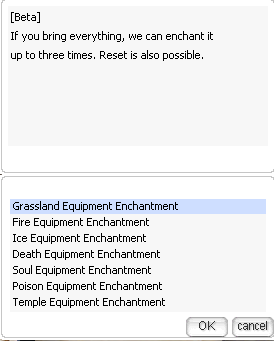
The nearby enchantment NPC is commonly named Chirp. This NPC handles eligible Varmundt Rune equipment and its enchantment slots.
Speak to Chirp after obtaining the rune that matches the equipment family.
How to Obtain the Correct Rune
Each Varmundt equipment family normally uses a corresponding rune.
Equipment family
Corresponding rune
Varmundt Glade Rune equipment
Glade Rune
Varmundt Fire Rune equipment
Fire Rune
Varmundt Ice Rune equipment
Ice Rune
Varmundt Death Rune equipment
Death Rune
Varmundt Temple Rune equipment
Temple Rune
Varmundt Soul Rune equipment
Soul Rune
Varmundt Venom Rune equipment
Venom Rune
For example, a Varmundt Fire Rune Armor normally requires a Fire Rune. A Glade Rune should not be purchased for Fire Rune equipment unless another NPC option specifically requests it.
Eligible Equipment
The basic Varmundt enchantment system generally supports Varmundt Rune armor, manteau, and boots.
Glade Rune Equipment
Varmundt Glade Rune Armor [1]
Varmundt Glade Rune Manteau [1]
Varmundt Glade Rune Boots [1]
Fire Rune Equipment
Varmundt Fire Rune Armor [1]
Varmundt Fire Rune Manteau [1]
Varmundt Fire Rune Boots [1]
Ice Rune Equipment
Varmundt Ice Rune Armor [1]
Varmundt Ice Rune Manteau [1]
Varmundt Ice Rune Boots [1]
Death Rune Equipment
Varmundt Death Rune Robe [1]
Varmundt Death Rune Manteau [1]
Varmundt Death Rune Boots [1]
Temple, Soul, and Venom equipment may also be available when the corresponding content is enabled on the server.
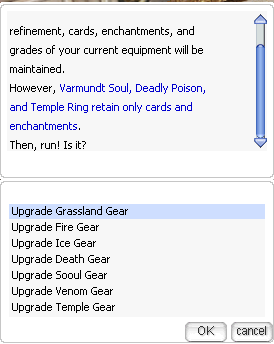
Varmundt equipment may use more than one enchantment slot. The basic system commonly works with the fourth and third option slots.
A common order is:
Add or unlock the fourth-slot enchantment.
Add or unlock the third-slot enchantment.
Reroll or improve an available enchantment through the appropriate NPC menu.
The NPC may refuse to enchant the third slot if the required fourth-slot enchantment has not been completed.
Players should follow the order displayed by the NPC. Do not assume that every equipment family uses identical requirements.
Possible Enchantments
Possible effects depend on the equipment, item grade, and server enchantment database. The system may include special Varmundt enchantments and normal status bonuses.
Examples include:
Power of Varmundt
Spell of Varmundt
Concentration of Varmundt
Stamina of Varmundt
Creative of Varmundt
Wisdom of Varmundt
STR bonuses
AGI bonuses
VIT bonuses
INT bonuses
DEX bonuses
LUK bonuses
Higher-level special enchantments normally provide stronger effects and may have a lower chance of being selected.
The NPC may check the equipment's refinement level or grade.
Possible restrictions include:
A minimum refinement level.
A maximum refinement level for a particular operation.
A required Grade D, C, B, or A.
Different bonuses based on equipment grade.
Different materials for graded or reformed equipment.
If the NPC rejects an item, check the equipment grade, refinement level, item ID, and whether the base or reformed version is required.
Common Problems and Solutions
The NPC Does Not List My Equipment
Check all of the following:
The equipment is in the character inventory.
The equipment is not inside storage or a cart.
The equipment has been unequipped.
The item is a supported Varmundt item.
The equipment has the correct item ID.
The required previous enchantment slot has been completed.
The equipment meets the required refinement or grade.
The server script supports that equipment family.
The Exchange Button Cannot Be Confirmed
Possible causes:
Insufficient exchange materials.
Insufficient Zeny.
Insufficient inventory space.
The character is overweight.
The wrong quantity was entered.
Another game interface is still open.
The Required Rune Is Missing
Return to the exchange list and use the scroll bar. Temple, Soul, or Venom Runes may appear farther down the list.
If the rune is not present, the corresponding episode content or barter entry may not be enabled on the server.
The Navigation Command Does Not Work
Use:
/navi ba_in01 364/50
If the client cannot navigate to the coordinates, travel manually to the eastern or lower-right side of Varmundt's Mansion Interior.
A Game Master can verify the location with:
@warp ba_in01 364 50
The Enchantment Interface Does Not Open
Try the following:
Close all other NPC windows.
Relog the character.
Place the equipment in the normal inventory.
Confirm that the character is not overweight.
Speak to the NPC again.
If the problem continues, report the following to the server staff:
Character name
Equipment name
Equipment item ID
Rune name and item ID
Map and coordinates
Screenshot of the NPC message
Date and approximate server time
Safety Checklist
Before pressing the final confirmation button, verify:
The correct equipment is selected.
The correct elemental rune is prepared.
The correct enchantment slot is selected.
The Zeny cost is acceptable.
The existing enchantment can be safely replaced.
The item will not be destroyed or downgraded on failure.
There is sufficient inventory space.
Example Player Walkthrough
A player wants to enchant Varmundt Fire Rune Boots [1].
The player travels to ba_in01 364, 50.
The player opens the rune exchange shop.
The player selects Fire Rune, not Glade, Ice, or Death Rune.
The player checks the required exchange material and displayed Zeny cost.
The player completes the exchange and confirms that Fire Runes are in the inventory.
The player speaks to Chirp near ba_in01 363, 53.
The player selects Varmundt Rune equipment enchantment.
The player selects Varmundt Fire Rune Boots [1].
The player checks the target slot, rune requirement, Zeny cost, and success information.
The player confirms the enchantment.
The player checks the boots description to view the new effect.
The same process can be followed for Glade, Ice, Death, Temple, Soul, or Venom equipment by using the matching rune.
Frequently Asked Questions
Can I use a different elemental rune?
Normally, no. Use the rune corresponding to the equipment family unless the NPC specifically requests a different material.
Can the enchantment result be chosen?
This depends on the NPC option. Some operations use a random enchantment pool, while others may offer a fixed selection or upgrade path. Read the NPC description before confirming.
Will enchanting remove refinement?
Normal enchanting should not be assumed to remove refinement, but the actual NPC message and server configuration must be checked before proceeding.
Can the equipment be destroyed?
This depends on the configured operation. Check the NPC's failure message. Do not proceed if the destruction rule is unclear.
Why is my item not accepted?
The most common reasons are an unsupported item ID, wrong equipment version, missing prerequisite enchantment, insufficient refinement, wrong grade, or the item being equipped or stored outside the normal inventory.
Where can I get more runes?
Runes and their required materials may be obtained through the Varmundt Biosphere content, monster drops, daily quests, or the exchange NPC, depending on the server configuration.
Final Reminder
Always match the rune to the equipment family and carefully check the target enchantment slot. Rerolling and resetting can permanently remove an existing effect.
For direct navigation, use:
/navi ba_in01 364/50
Complete Process Summary
Reach Base Level 130 or higher.
Complete Episode 17.1 and progress through Episode 17.2.
Register with Mansion Manager Alpha.
For Biosphere farming, reach Base Level 240 and complete Admin Beta's introduction.
Travel to /navi ba_in01 364/50.
Exchange materials for the rune matching the equipment family.
Keep the eligible Varmundt equipment, matching rune, and required Zeny in inventory.
Speak to Chirp near /navi ba_in01 363/53.
Select the equipment and target enchantment slot.
Review all costs, success information, and replacement warnings.