Costume Enchantment Guide

Welcome to the Costume Enchantment system! This guide explains how to add, retry, and reset enchantments on eligible costume equipment.
NPC Location
- NPC: Costume Enchanter
- Map: Inside Prontera (prt_in)
- Coordinates: 57, 69
Eligible Costume Equipment
The Costume Enchanter currently supports these equipped costume positions:
- Costume Upper Headgear
- Costume Middle Headgear
- Costume Lower Headgear
- Costume Garment
Important: Equip the costume that you want to enchant before speaking to the NPC. Only eligible costumes currently equipped will be displayed.
Available Enchantment Slots
Each eligible costume can use up to four enchantment slots:
- Slot 2
- Slot 3
- Slot 4

An empty slot appears as Enchant Slot. An occupied slot appears as Reset Slot, together with the current enchantment name.
Enchantment Cost
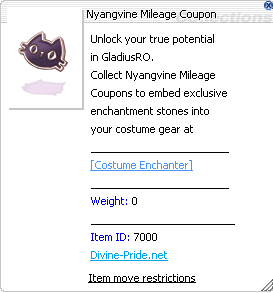
- Initial enchant attempt: 20 Nyangvine Mileage Coupons
- Retry after failure: 10 Nyangvine Mileage Coupons per retry
- Maximum immediate retries: 3
The required coupons are consumed for each attempt. Make sure enough coupons are available in the character's inventory before starting.
How to Enchant a Costume
- Equip the eligible costume that you want to enchant.
- Speak to the Costume Enchanter at prt_in 57,69.
- Review the cost information displayed by the NPC.
- Select the equipped costume position: Top, Middle, Lower, or Garment.
- Select an empty option labelled Enchant Slot 1, Enchant Slot 2, Enchant Slot 3, or Enchant Slot 4.
- Select the desired enchantment from the list.
- Review the enchantment cost and success chance.
- Select Yes to proceed.
- If successful, the enchantment is added to the chosen slot.
- If the attempt fails, choose whether to use an immediate retry.
Success Chances
Enchantments are selectable, but success is not guaranteed.
10% Success Chance
- ASPD +1
- 1% chance to absorb 1% of physical damage as HP
- 1% chance to absorb 1% of physical damage as SP
- Fixed Casting Time enchantments
- Double Attack
- Fatal Robe
- Casting Robe
- Supported class costume-stone enchantments
- Expert Archer 3: Long-ranged physical damage +6%
Supported class-stone options include Sura, Ranger, Sorcerer, Rune Knight, Genetic, Warlock, Shadow Chaser, Mechanic, Wanderer/Minstrel, Arch Bishop, Royal Guard, Guillotine Cross, Soul Reaper, Star Emperor, Kagerou, Oboro, Rebellion, Doram, and additional supported variants.
20% Success Chance
- STR +10
- INT +10
- DEX +10
- AGI +10
- VIT +10
- LUK +10
Tip: Always check the enchantment name and chance displayed by the NPC before confirming. The NPC display is the final in-game reference.
What Happens if an Enchantment Fails?
- The selected enchantment is not added.
- The costume is returned and automatically equipped again.
- Existing enchantments in the other slots are preserved.
- The cost for the failed attempt remains consumed.
- An immediate retry costs 10 Nyangvine Mileage Coupons.
- Up to three immediate retries are available during that interaction.
If the retry is declined, or all retries are used, speak to the NPC again to begin a new attempt at the normal cost.
How to Reset an Enchantment
Resetting removes one selected enchantment slot. It does not clear every slot at once.
- Reset cost: 5 Bags of Bronze Coins
- Equip the costume containing the enchantment to be removed.
- Speak to the Costume Enchanter.
- Select the equipped costume.
- Select the correct Reset Slot option.
- Check the enchantment name shown beside the slot.
- Confirm the reset.
- The selected enchantment is removed, leaving that slot empty.
Warning: Resetting permanently removes the selected enchantment. Previously used materials are not refunded.
Important Notes
- The costume must be equipped before speaking to the NPC.
- Only Costume Upper, Middle, Lower, and Garment positions are supported.
- Choose the correct costume and slot carefully.
- Each successful enchantment occupies one slot.
- An occupied slot must be reset before it can receive a different enchantment.
- Attempt and retry materials are consumed even if enchanting fails.
- Successful special enchantments may be announced to the server.
- Keep enough inventory space available before using the system.
Quick Cost Summary
- Initial attempt: 20 Nyangvine Mileage Coupons
- Retry after failure: 10 Nyangvine Mileage Coupons
- Maximum immediate retries: 3
- Reset one slot: 5 Bags of Bronze Coins
Frequently Asked Questions
Can I choose my enchantment?
Yes. Select the desired enchantment from the NPC's available list.
Can I enchant all four slots?
Yes. Slots 1 through 4 are available. Each slot is enchanted separately and requires a separate successful attempt.
Will a failed attempt destroy my costume?
No. The costume is returned and equipped again. The materials used for the failed attempt are consumed.
Will failure remove existing enchantments?
No. Existing enchantments in other slots are preserved.
Can I replace an enchantment directly?
No. Reset the occupied slot first, then enchant the empty slot again.
Does resetting remove every enchantment?
No. Only the selected slot is cleared.
Are retries guaranteed to succeed?
No. Each retry uses the same displayed success chance for the selected enchantment.
Why is my costume not shown?
Check that:
- The costume is equipped.
- It is equipped in the Costume Upper, Middle, Lower, or Garment position.
- The correct character has the required materials.
Good luck with your costume enchantments! Always confirm the selected costume, slot, cost, and success chance before proceeding.