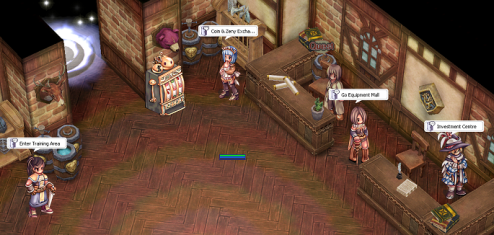
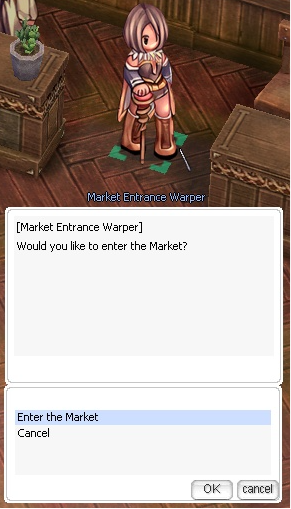
The Warper provides quick access to the Market Entrance Warper, the main trading centre where players can buy and sell a wide variety of items.
location: prontera,151,187
Inside the market, players can:
Browse shops selling weapons, armour, accessories, and other equipment.
Purchase pet eggs, pet accessories, taming items, and other pet-related supplies.
Find consumables, materials, rare items, and miscellaneous goods.
Open their own Vending Shop to sell items directly to other players.
Players who wish to sell items may enter through the Market Entrance Warper, choose a suitable vending location inside the market, and open a shop using the game’s vending system. Prices are determined by individual sellers, so buyers are encouraged to compare different shops before purchasing.
Whether purchasing new equipment, searching for pet supplies, selling valuable items, or looking for rare goods, the GladiusRO Market is the primary destination for player-to-player trading. Speak to the Market Entrance Warper to enter the market and start shopping or vending.
location: prt_inGo to Warper at prontera, 151, 187 , then select GladiusRO Market.
Visit the Market Entrance Warper at prt_in, 135, 31.
Speak to the NPC.
Select Enter the Market.
The NPC will teleport your character directly to the Market.
location: prt_in,135,31
1st–4th Job Equipment NPCs
Location: prt_mk 162,121 (1st job to 4th job equipment NPC)
The Job Equipment NPCs provide weapons, armor, accessories, and other equipment for characters progressing from 1st Job through 4th Job. All equipment merchants are grouped along the area indicated by the yellow arrows in the picture, making it easier for players to browse equipment for different jobs and equipment types.
NPC Location
Map:prt_mk — Prontera Market Street
General area: Along both sides of the central southern pathway
Map position shown in picture: Near prt_mk 162,121
Directions: Follow the yellow arrows south from the center of the map.
The equipment NPCs are positioned in rows on both sides of the pathway. Players should walk along the marked route and speak to the appropriate NPC for the required job level and equipment category.
Purchase Requirements
1st and 2nd Job Equipment
Equipment for 1st Job and 2nd Job characters can be purchased using Zeny.
3rd and 4th Job Equipment
Equipment for 3rd Job and 4th Job characters requires:
Zeny
Etel Dust
HD Etel Bradium
HD Etel Carnium
Brown Diamond
The required materials can be obtained inside the Mining Area (You can go to Warper NPC, then select Mining Area, then choose any map to start mining). The exact Zeny price and material quantity depend on the equipment’s type and tier. More advanced equipment requires more Zeny and mining materials.
Available Equipment
The merchants provide numerous equipment categories, including:
Weapons for different jobs and classes
Armor
Garments
Footgear
Accessories
Headgear
Shields
Shadow Equipment
Other job-specific equipment
Each equipment category may have its own NPC. Players should check the NPC names and shop contents to find suitable equipment for their character.
Benefits
Provides a clear equipment progression path from 1st Job to 4th Job.
Gives players convenient access to job-specific weapons and equipment.
All equipment NPCs are grouped in the same area for easier navigation.
Early-game equipment can be purchased directly using Zeny.
Advanced equipment can be obtained by collecting materials from the Mining Area.
Supports character progression into more advanced jobs and higher equipment tiers.
Offers equipment for many weapon types, armor slots, and character builds.
Rewards players for participating in mining and gathering activities.
How to Purchase Equipment
Travel to Prontera Market Street at prt_mk.
Go to the location indicated by the yellow arrows.
Find the NPC that sells the required equipment category.
For 1st or 2nd Job equipment, prepare enough Zeny.
For 3rd or 4th Job equipment, prepare the required Zeny and mining materials.
Speak to the NPC and check the exact requirement before completing the purchase.
Tip: Visit the Mining Area before shopping for 3rd or 4th Job equipment. Collect Etel Dust, HD Etel Bradium, HD Etel Carnium, and Brown Diamond, as stronger equipment requires larger quantities of these materials.
GladiusRO Lottery (NPC)
location: prt_in,130,39
The GladiusRO Lottery is a coin-bag lottery system where players can purchase tickets for a chance to win prizes contributed by participating players.
NPC Location
Map: Prontera Interior (prt_in)
Coordinates:130, 39
Lottery Information
Each player may purchase up to 10 tickets per lottery round.
Players choose a lucky number from 1 to 9,999.
Winner will be automatic selected by system up to 5 number
The automatic lottery draw takes place at 21:00 server time (GMT+8) every day.
Each ticket may require between 1 and 100 Bronze, Silver, or Gold Coin Bags.
How to Participate
Visit the GladiusRO Lottery NPC at prt_in, 130, 39.
Speak to the NPC and select Buy Ticket.
Choose the number of tickets to purchase.
Select your preferred lucky number from 0001 to 9999.
Complete the purchase using the required Coin Bags.
Return after the daily draw to check the result.
NPC Options
Buy Ticket — Purchase a lottery ticket and choose a lucky number.
View My Tickets — Review tickets purchased for the current lottery round.
Top 20 Purchasers — View the players who purchased the most tickets.
Top 20 Winners — View the leading lottery winners.
Check Results / Claim — Check the latest result and claim an eligible prize.
Check Bag Returns — Check whether any Coin Bags are available to be returned.
View Winner Prizes — View the available prizes.
Important: Make sure to check the lottery result and claim any available prize after the daily draw.
GladiusRO Exchanger (NPC)
location: prt_in,133,38
The GladiusRO Exchanger allows players to convert Bags of Coins into Zeny or exchange Zeny into Bags of Coins. Bags of Coins are used for various GladiusRO features, including Costume Enchantment, GladiusRO Investment, GladiusRO Lottery, Kachua Keys, and many more.
NPC Location
Map: Prontera Interior (prt_in)
Coordinates:133, 38
NPC Name: GladiusRO Exchanger
How to Exchange Currency
Visit the GladiusRO Exchanger at prt_in, 133, 38.
Speak to the NPC.
Select one of the available options:
Exchange Bags of Coins to Zeny
Exchange Zeny to Bags of Coins
Select the type of Coin Bag that you want to exchange.
Enter the desired quantity.
Confirm the exchange.
Available Coin Bags
Bag of Bronze Coins:1,000,000 Zeny
Bag of Silver Coins:20,000,000 Zeny
Bag of Gold Coins:250,000,000 Zeny
Important Information
Make sure the character has sufficient inventory space and weight capacity before exchanging Zeny for Bags of Coins.
Make sure the character has enough Zeny to complete the exchange.
When exchanging Bags of Coins into Zeny, the transaction cannot cause the character to exceed the maximum Zeny limit.
Always check the selected Coin Bag and quantity before completing the exchange.
Pet Merchant (NPC)
Location: prt_mk, 165,150
The Pet Merchant allows players to purchase a wide selection of Renewal Pet Eggs conveniently from one NPC. The shop contains 105 unique Pet Eggs, divided into five shop pages for easier browsing. Every Pet Egg is sold at a fixed price of 5,000,000 Zeny.
NPC Location
Map:prt_mk
Coordinates:165, 150
NPC Name: Pet Merchant
Benefits
Provides convenient access to 105 different Pet Eggs.
No need to hunt monsters or search multiple locations for available eggs.
All eggs have the same fixed price of 5,000,000 Zeny.
Eggs are separated into five shop pages, making them easier to browse.
Helps players collect pets and choose companions that may provide unique bonuses when properly cared for and equipped with the appropriate pet accessory.
How to Purchase
Visit the Pet Merchant at prt_mk 165,150.
Speak to the NPC.
Select one of the five Pet Egg shop pages.
Choose your preferred Pet Egg.
Complete the purchase using Zeny.
Pet Supply Merchant (NPC)
Location: prt_mk 167,150
The Pet Supply Merchant is a convenient one-stop NPC that provides essential items for raising and caring for pets. Players can purchase Pet Food, Pet Accessories, and Pet Incubators from a single merchant.
NPC Location
Map:prt_mk
Coordinates:167, 150
NPC Name: Pet Supply Merchant
Available Supplies
53 Pet Food items, divided into three shop pages.
41 Pet Accessories, divided into two shop pages.
Pet Incubators for hatching Pet Eggs.
Prices
Pet Food: 10,000 Zeny each
Pet Accessories: 1,000,000 Zeny each
Pet Incubator: 100,000 Zeny each
Benefits
Purchase all essential pet supplies from one convenient NPC.
Easily find suitable food to feed and care for different pets.
Purchase accessories that may unlock or activate a pet’s available bonuses.
Purchase Pet Incubators to hatch Pet Eggs.
Supplies are organized into separate shop pages for easier browsing.
Saves time by removing the need to search for pet supplies in multiple locations.
How to Use
Visit the Pet Supply Merchant at prt_mk 167,150.
Speak to the NPC.
Select the required category:
Pet Food
Pet Accessories
Pet Incubator
Select the appropriate shop page.
Choose the required item and complete the purchase using Zeny.
Tip: Keep enough Pet Food available to care for your pet. Check which food and accessory are suitable for the selected pet before purchasing